December is one of the busiest digital months of the year. New devices arrive, shopping moves online, travel picks up, and social media lights up. All that activity gives cybercriminals a perfect opening because people are distracted and rushing.
Last festive season, Britons lost an estimated £11.5 million to online shopping fraud. With phishing still the main attack method affecting UK homes and businesses, a few small steps can make a huge difference.
This guide brings together practical actions that help keep your home, your devices, and your family safer during the holidays.
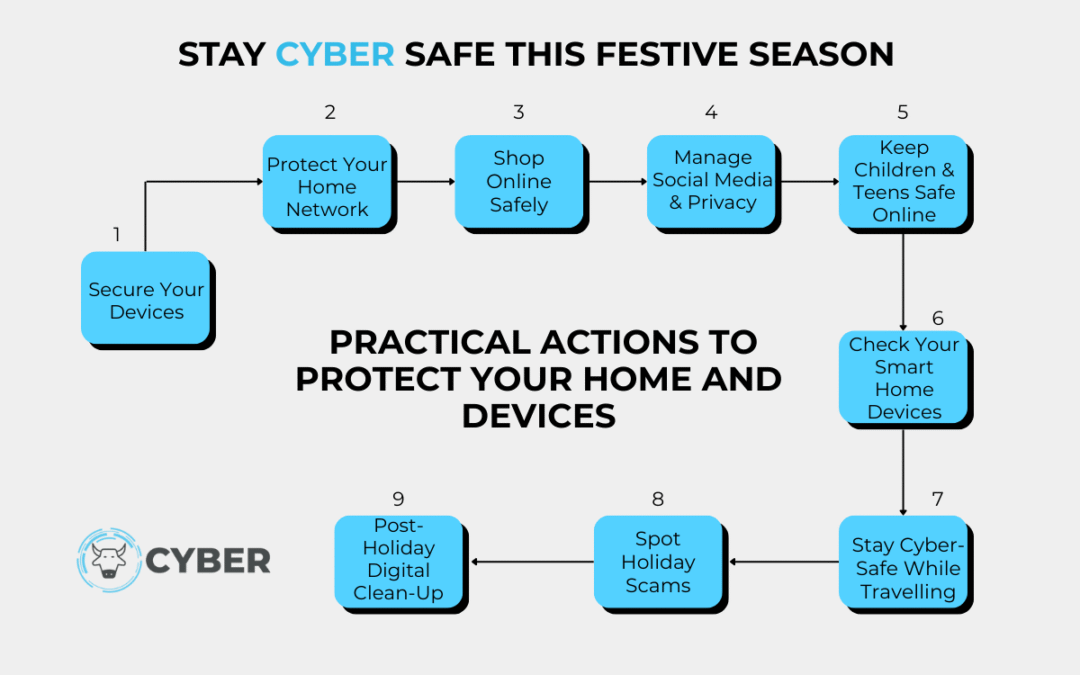
1. Keep Your Devices in Good Shape
Your devices store your photos, messages, bank details, and login information. A quick tune up before the holidays strengthens your protection.
Do this:
• Update your devices and apps.
• Remove old or unused apps.
• Restart phones and laptops.
• Turn on automatic updates.
2. Look After Your Home Wi-Fi
More guests and more gadgets connect at this time of year. A tidy network is a safer network.
Do this:
• Change the router password to something strong.
• Update the router firmware.
• Use the guest Wi-Fi for visitors or new devices.
• Remove devices you do not recognise.
3. December is peak season for fake websites, delivery scams and manipulated payment pages.
Do this:
• Go to retailer sites by typing the address yourself.
• Use trusted payment options.
• Ignore messages about “redelivery fees”.
• Turn on card or bank alerts.
4. Be Careful With Social Media
Sharing plans and new purchases can accidentally give away more than you realise.
Do this:
• Avoid posting travel plans until you return.
• Use private accounts for family content.
• Turn off location settings on older posts.
• Disable contact syncing on apps that do not need it.
5. Look After Children and Teens Online
With more free time, younger users explore, download, message and play more.
Do this:
• Set age limits and time controls.
• Turn off in-game purchases or require approval.
• Remind them not to chat with strangers in games.
• Keep all apps updated.
6. Check Smart Home Devices
Doorbells, lights, speakers and cameras are convenient but need proper setup.
Do this:
• Change all default passwords.
• Place smart devices on the guest network.
• Disable remote access if you never use it.
• Turn on multi-factor authentication in the app.
7. Stay Safe When Travelling
Public Wi-Fi and crowded spaces introduce extra risk.
Do this:
• Avoid using public Wi-Fi for sensitive tasks.
• Turn off Bluetooth, AirDrop, and auto-connect options.
• Keep devices in carry-on bags.
• Use a VPN if needed.
8. Watch Out for Seasonal Scams
December is full of fake charities, delivery messages and gift card traps.
Do this:
• Double check delivery notifications.
• Donate directly on official charity websites.
• Avoid buying gift cards through messages.
• Check sender domains carefully.
9. After the Holidays, Do a Quick Digital Clean
A short tidy up in January helps you start the new year safely.
Do this:
• Remove apps you no longer need.
• Update passwords used during travel.
• Look for unusual bank transactions.
• Restart your router and check connected devices.
A Safer Festive Season
Holiday cyber safety is not about complicated tools. It is about small changes that give you more control and reduce risk. With just a few simple habits, you can protect your home and enjoy the festive season with fewer worries.